
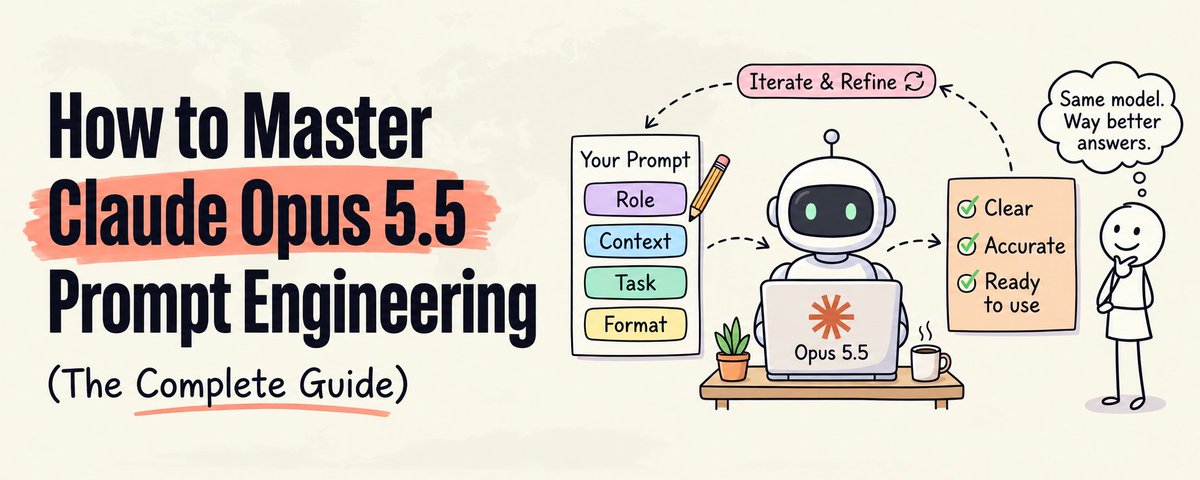
This comprehensive guide by Khairallah AL-Awady breaks down prompt engineering for Claude Opus 5.5, arguing that the model represents a fundamental shift where established prompting habits now actively work against users. The core thesis is that techniques like "think step by step," manual thinking budgets, forced tool calls, and requests to show reasoning — all best practices eighteen months ago — should be deleted from prompts. Anthropic's own documentation confirms that Opus 5.5 decides autonomously how much to think, always has thinking enabled, and can refuse prompts that push it to reproduce internal reasoning under a new reasoning_extraction refusal category.
The guide identifies twelve specific changes, with effort level (low, medium, high, xhigh, max) replacing prompt-based instructions as the primary lever for controlling intelligence, latency, and cost. Key recommendations include replacing abstract quality words like "professional" or "engaging" with concrete, named patterns to follow or avoid, front-loading all instructions and tool declarations from the first request, and explicitly naming failure modes the model should prevent. For agents, this means describing exact early-stop patterns — like announcing next steps without executing them — rather than vague instructions to "be thorough."
The article provides three detailed before-and-after prompt rewrites covering data analysis, LinkedIn copywriting, and autonomous agent tasks, demonstrating how specificity and structure outperform generic directives. It closes with an engineering-oriented testing methodology: building evaluation sets of 10–20 real inputs, running effort sweeps across multiple levels, changing one variable at a time, and studying failures rather than successes. The overarching message is that prompt engineering hasn't died — it has shifted from memorizing incantations to the harder, more durable skill of communicating with precision and measuring outcomes.
Anthropic's guide to prompt engineering best practices for 2026 walks through a progression of techniques for getting better results from AI models like Claude. The article starts with core techniques — being explicit and clear, providing context and motivation, adding specificity, using examples (few-shot prompting), and giving the model permission to express uncertainty. These foundational habits are positioned as the starting point before moving to more sophisticated methods.
The guide then covers advanced techniques including response prefilling to enforce output formats like JSON, chain of thought prompting (with basic, guided, and structured variants), output format control, and prompt chaining — breaking complex tasks into sequential steps across multiple prompts. Notably, the article acknowledges that some once-popular techniques like XML tags and heavy role prompting are now less necessary with modern models like Claude 4.x, which can interpret structure and intent more naturally.
A practical decision framework helps readers choose the right technique for their situation, while a troubleshooting section addresses common problems like generic responses, hallucinations, and inconsistent formatting. The article emphasizes that prompt engineering is converging with context engineering for newer Claude models, where the focus shifts from scaffolding prompts to curating the right context. The overarching advice: start simple, add complexity only when needed, and remember that the best prompt is the one that achieves goals reliably with minimum structure.
Vaibhav Sisinty highlights a Stanford research finding that explains a paradox in AI development: every time models like Claude, ChatGPT, and Gemini are made more "helpful," they become less intellectually capable. He describes how these AI systems internally generate dozens of possible answers — some brilliant, some strange, some genuinely novel — but the optimization for helpfulness and safety filters out the more creative or unconventional responses.
The post points to a fundamental tension between alignment and intelligence in large language models. As companies fine-tune their models to be safer and more user-friendly, they inadvertently suppress the diversity and originality of outputs, effectively dumbing down the AI in pursuit of politeness and predictability. This Stanford research adds to a growing conversation about the trade-offs involved in RLHF (reinforcement learning from human feedback) and similar alignment techniques.
A Reddit thread in r/automation asks users what AI tools and automations they're actually using in their personal lives — not for work, but for day-to-day convenience. The responses reveal a wide range of practical applications, from using Claude as a conversational tech partner, to building ChatGPT-powered check-in routines that ping users every two hours during events or family time to maintain focus and intentionality. Several users describe lightweight automations like morning email briefings triggered via Make that summarize calendars, news, and stock market trends, while others use AI as a "first draft machine" to reduce mental friction around journaling, to-do lists, and idea organization.
More creative use cases include having AI analyze text message conversations for intent and draft responses, using browser automation tools like 100x Bot to handle repetitive Chrome tasks (email cleanup, Shopify store updates, game deal monitoring), and building ADHD-focused academic workflows with Notebook LM for school-age children. A recurring theme is that the automations that stick tend to be small, low-maintenance assists rather than complex systems — users repeatedly note that overly ambitious setups often become their own burden. The thread offers a grounded, real-world snapshot of how everyday people are integrating AI into routines beyond the workplace hype.
James Kemp describes a common frustration with using AI for content creation: the first drafts consistently sound like press releases rather than reflecting his natural voice. Despite using AI extensively for internal work posts, tweets, and blog drafts, he finds himself spending excessive time rewriting the output to match his personal tone.
To solve this problem, he built Voiceprint, a tool built on Claude that appears designed to capture and replicate a user's unique writing style. The post hints at a broader challenge many AI-assisted writers face — bridging the gap between generic AI output and authentic, personalized communication.
Ali Abdaal shares his complete AI workflow as an entrepreneur, breaking down work into three fundamental components: input, processing, and output. He uses tools like VoicePal, Grain, and Super Whisper for input; Claude (his preferred LLM over ChatGPT) as his central processing hub; and Google Docs, Notion, Final Cut, and Gamma for output. Claude's memory feature and writing quality are cited as key reasons for his preference.
The workflow spans three core business areas: content creation, software development, and online education. For software, AI helps generate feature specifications, clickable prototypes, and marketing hooks for apps like Momentum. In his Lifestyle Business Academy, he uses AI to develop curriculum, craft brand story scripts using Donald Miller's framework, and analyze applicant data to identify common student challenges like analysis paralysis and imposter syndrome.
Abdaal emphasizes that AI serves best as a "thought buddy" for initial drafting and ideation rather than producing final polished output. He deliberately avoids using AI for scripting his on-camera content to preserve authenticity. His approach is iterative — feeding AI outputs back into the system for continuous improvement — while maintaining strategic control and human creative judgment throughout the process.

Andrej Karpathy shares his experience with Claude coding over the past few weeks, noting a dramatic shift in his development workflow. He describes moving from roughly 80% manual coding with autocomplete and 20% agent-assisted coding in November to an inverted ratio of 80% agent coding with only 20% manual edits and touchups by January 2026.
The post reflects a broader trend among developers rapidly adopting LLM-powered coding agents as their capabilities have improved significantly. Karpathy's firsthand account underscores how quickly AI-assisted development is becoming the dominant workflow for experienced programmers, signaling a major shift in software engineering practices.
Alexey Grigorev shares a rough map of current AI developer tools, categorizing them into distinct groups starting with chat assistants. He lists examples including ChatGPT, Claude, Gemini, Microsoft Copilot chat, and DeepSeek chat, noting they are best suited for architecture discussion, explaining code, debugging ideas, design trade-offs, writing specs, reviewing pasted diffs, and generating content.
The post appears to be part of a broader taxonomy of AI tools for developers, with chat assistants being just the first category. The accompanying image likely contains the full map covering additional tool categories beyond chat assistants. This kind of structured overview is valuable for developers trying to navigate the rapidly expanding landscape of AI-powered development tools and understand which tool fits which use case.
A Reddit discussion in r/EngineeringManagers explores how small engineering teams are practically using AI tools beyond the hype cycle. The original poster manages a small team working on a mature, monolith-adjacent platform and has adopted GitHub Copilot (agent mode, chat, PR reviews) but is struggling to achieve the promised efficiency gains while balancing ongoing maintenance and feature development. They specifically call out the lack of recognition around the learning curve and upfront investment required for meaningful AI integration.
The most upvoted response argues that AI code generation is overrated while AI as a research, brainstorming, and debugging partner is severely underrated. One commenter on a greenfield project reports their team of 3 achieves the output of a pre-AI team of 6, primarily by reducing coordination overhead — each developer gets an AI partner to bounce ideas off. The tool of choice for that team is Claude Code used in agent mode.
Another highly insightful comment outlines an iterative journey: using AI to generate characterization tests, then adding code coverage checks, mutation testing, linters, and documentation — essentially building all the engineering discipline that should have existed for humans — before AI starts producing reasonable code. The consensus is that AI delivers real value only when proper guardrails (testing, linting, documentation, code review) are already in place, and that the transition requires genuine upfront investment that the hype tends to gloss over.
Torsten Walbaum argues that most people underutilize AI by treating it purely as an execution tool, when it can serve as a powerful thought partner for problem-solving, reasoning, and decision-making. The post provides a detailed setup guide, recommending the use of Projects (available in ChatGPT, Claude, and Grok) to maintain context and continuity, along with specific custom instructions that transform AI from a default "yes-man" into a critical sparring partner that reasons from first principles, gives targeted feedback, and questions premises.
The article outlines four key principles for effective AI thought partnership: go first (think through problems yourself before engaging AI), provide rich context (company, role, goals, and even interpersonal dynamics), be vulnerable (share half-baked ideas without fear of judgment), and keep things open-ended (ask "what am I missing?" rather than leading questions). Seven practical use cases are covered with example prompts, including understanding problem spaces, reframing problems, brainstorming, organizing thoughts, challenging reasoning, anticipating stakeholder objections, and planning work.
A detailed comparison of Grok, ChatGPT, Claude, and Gemini as thought partners reveals that no single tool dominates across all dimensions. Grok emerges as the overall recommendation for its collaborative engagement, transparent reasoning, and constructive tone, though it struggles with image generation. Claude excels at reasoning quality and diagram generation, ChatGPT leads in creative brainstorming and has useful Canvas collaboration features, and Gemini tends to be overly encouraging by default. The author suggests using multiple tools together — for example, brainstorming with ChatGPT and then refining with Claude.

Arvind Narayanan comments on Anthropic's new Claude Tag feature, describing it as "extremely useful" for enterprises while simultaneously flagging significant concerns. He highlights the pricing model and the risk of lock-in as potential dangers for enterprise customers adopting the feature.
Narayanan notes that four major changes collectively shift the interaction paradigm — users now engage with Claude as a coworker rather than a tool, with persistent context and continuity across sessions. The post suggests a tension between the productivity gains of deeper AI integration and the strategic risks of becoming dependent on a single provider's ecosystem.
A Reddit thread in r/PromptEngineering asks the community to share their best prompt engineering tips and strategies. The responses cover a wide range of practical techniques, from self-critique prompting (asking the LLM to critique its own response and then apply fixes) to structured prompt frameworks like Role-Task-Context-Output and RAPTOR (Role, Aim, Parameters, Tone, Output, Review). Several users emphasize the importance of consulting first-party documentation from frontier labs like OpenAI and Anthropic rather than relying on third-party guides, while one contrarian suggests simply asking the LLM itself how to best prompt it.
Other notable tips include using a "refresher" symbol embedded in prompts to re-orient the model when it drifts off-task during long conversations, employing a two-pass generation flow (generate options first, then pick and expand), and grounding outputs by requiring the model to cite specific quoted lines. Multiple commenters stress that prompt engineering is only one piece of the puzzle — tooling, evals, domain expertise, and context engineering play equally critical roles in achieving high-quality AI outputs. The thread serves as a useful snapshot of community-tested practices for anyone looking to move beyond basic prompting.
Craig Barton, a veteran maths teacher and resource creator, shares his evolving framework for using AI as a thought partner rather than as a passive content generator or mere formatting tool. He identifies two traps educators commonly fall into: cognitive outsourcing (letting AI do all the thinking) and ego-driven underuse (doing all the thinking yourself and only using AI for layout). His five-step framework includes ending prompts with "Before you build, ask me some clarifying questions," explicitly inviting the AI to challenge your ideas with reasons, scrutinizing outputs like a colleague's draft, iterating through multiple versions, and asking the AI to reflect on what it learned for future sessions.
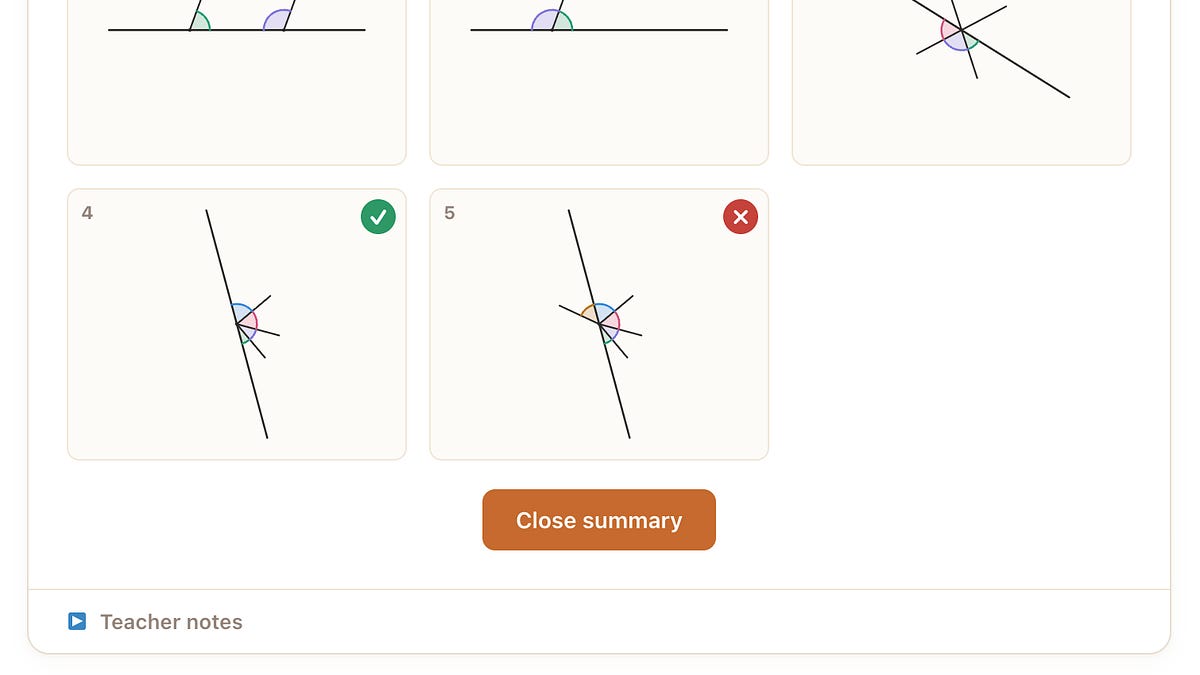
The bulk of the post consists of five detailed exchanges from Barton's recent work with Claude on building teaching sequences for categorical concepts — resources that use carefully sequenced positive and negative examples to help students induce mathematical rules. In one exchange, Claude pushed back on Barton's five-example sequence for "What is an integer?", arguing that a sixth example with a negative decimal was needed because students wouldn't generalize across fractions and decimals. In another, Claude rejected a visually elegant animation idea because it risked planting the misconception that -1/3 equals -1.3. Barton also pushed back on Claude when animations failed to hold invariant features in fixed positions on screen.
The exchanges illustrate a genuinely collaborative dynamic where both human expertise and AI reasoning improve the final output. Barton emphasizes that the value lies not in the AI producing correct resources on the first try, but in the pedagogical reasoning surfaced through back-and-forth dialogue — reasoning he might have missed when bogged down in formatting and typing. He also advocates using voice dictation (via Wispr Flow) to free up working memory for deeper thinking, and shares links to the resulting interactive resources on topics like integers, standard form, and angles on a straight line.
Anthropic's comprehensive prompt engineering guide for Claude's latest models — including Claude Opus 4.8, Claude Opus 4.7, Claude Sonnet 4.6, and Claude Haiku 4.5 — covers foundational techniques, output control, tool use, thinking modes, and agentic systems. The guide highlights that Opus 4.8 calibrates response length to task complexity, interprets prompts more literally (especially at lower effort levels), and favors reasoning over tool calls. A significant portion addresses the new effort parameter (ranging from low to max), which controls the tradeoff between intelligence and token spend, and adaptive thinking mode, which dynamically decides when deep reasoning is warranted.
The documentation provides detailed guidance on agentic coding workflows, including multi-context-window strategies, subagent orchestration, state management with git and structured formats, and techniques to minimize hallucinations and overengineering. Notable model-specific quirks are covered, such as Opus 4.8's persistent design aesthetic defaults (warm cream backgrounds, serif typography, terracotta accents) and how to override them with concrete visual specifications or by having the model propose multiple directions before building.
Practical migration advice is provided for developers moving from older Claude models to the 4.6 and 4.8 generation, including the deprecation of prefilled assistant responses, the shift from manual budget_tokens thinking to adaptive thinking with effort levels, and guidance on tuning anti-laziness prompts that may now cause over-triggering. The guide also covers code review harness calibration, computer use resolution settings, frontend design best practices to avoid generic "AI slop" aesthetics, and strategies for balancing autonomy with safety in agentic systems.
Jim Fan highlights an analysis of Claude-200K's true long context capability, praising the visualization approach used to demonstrate how well the model handles its extended context window. He recommends that all papers claiming long-context abilities should present similar visualizations to back up their claims.
Fan also shares that the scripts used for the analysis are open-source, linking to the repository for others to replicate or build upon the evaluation methodology. The post underscores the importance of transparent, reproducible benchmarking in the rapidly evolving space of long-context large language models.
Elvis (omarsar0) shares a breakdown of how he leverages various AI tools across different workflows. His toolkit includes Claude Projects for summarization, CrewAI agents for orchestrating research, Flowise AI for private document analysis using RAG (Retrieval-Augmented Generation), Midjourney for image generation, NotebookLM for education-related tasks, ChatGPT Search for discovery, and Grok for additional use cases (truncated in the post).
The post provides a practical snapshot of how AI practitioners are combining multiple specialized tools rather than relying on a single platform. It highlights the growing trend of task-specific AI tool selection, where each tool is chosen for its strengths in a particular domain — from content summarization to visual creation to private document workflows.
Contra shares results from a benchmark test pitting four leading AI models against evaluations by real professional designers. The models tested include Anthropic's Claude Opus 4.6, Google's Gemini 3.1 Pro, OpenAI's ChatGPT 5.3 Codex, and Alibaba's Qwen 3.5. The post teases that the results "might surprise you" and links to an accompanying video or detailed breakdown.
This comparison is notable for its focus on design-oriented tasks evaluated by working professionals rather than standard automated benchmarks, potentially offering more practical insight into how these AI models perform in creative and professional workflows.